Text to image
Describe the person, framing, expression, clothing, setting, lighting, and intended use. This mode is useful when you do not have a source image or need a new stock-style creator identity.

HypeUGC AI Avatar Studio
The HypeUGC AI avatar generator turns a text prompt or reference photo into campaign-ready avatar images. Download your best variation or continue with a talking AI twin.
Configure your settings and click "Generate Avatar" to create your AI avatar images
Choose the right input
HypeUGC offers two image workflows. Start with a text prompt when you need a new fictional person or character. Start with reference images when you want to change the clothing, setting, framing, or style while retaining the source image's visual identity. Both workflows create static images. To make the finished avatar speak, continue to the AI Twin Video Generator.
Describe the person, framing, expression, clothing, setting, lighting, and intended use. This mode is useful when you do not have a source image or need a new stock-style creator identity.
Upload one or more reference images, then describe the change. Clear, well-lit images with one visible person give the model more identity and composition information to work with.
Workflow
Verified interface controls
These settings reflect the current HypeUGC interface. Model availability and provider behavior can change, so review the values shown in the generator before a production run.
| Control | Current options | How to choose |
|---|---|---|
| Prompt | Up to 2,000 characters | State the subject and identity constraints before style details. |
| Reference images | Up to 10 in Image Edit mode | Use clear images of the same primary subject when identity matters. |
| Aspect ratio | 1:1, 16:9, 9:16, 4:3, 3:4, 21:9, or Auto | Match the intended placement instead of cropping after generation. |
| Number of images | 1 to 4 variations per request | More variations provide choices and also use more provider generation. |
| Download format | PNG, JPEG, or WebP | Use PNG for editing, JPEG for broad compatibility, or WebP for web delivery. |
| Pro controls | 1K, 2K, or 4K resolution when the Pro model is available | Use only the resolution required by the final placement to control cost. |
Prompt method
Treat the prompt as a visual production brief. Put identity and framing first, then describe the scene and style. A long list of adjectives is less useful than clear relationships between the person, product, camera, and environment.
[subject and identity constraints]
+ [framing and camera distance]
+ [expression and pose]
+ [clothing or product interaction]
+ [environment and background]
+ [lighting and visual style]
+ [aspect or use context]
+ [elements to avoid, when supported]
A realistic adult skincare creator, head-and-shoulders framing, relaxed direct eye contact, holding the labeled product at chest height, bright bathroom setting, soft natural window light, authentic phone-camera UGC style, clean 9:16 composition with space for captions.
State what must stay the same before the requested change. For example: keep the same person, facial features, hairstyle, expression, and camera angle; change only the clothing and background. Review the result because model variation is still possible.
Reference image quality
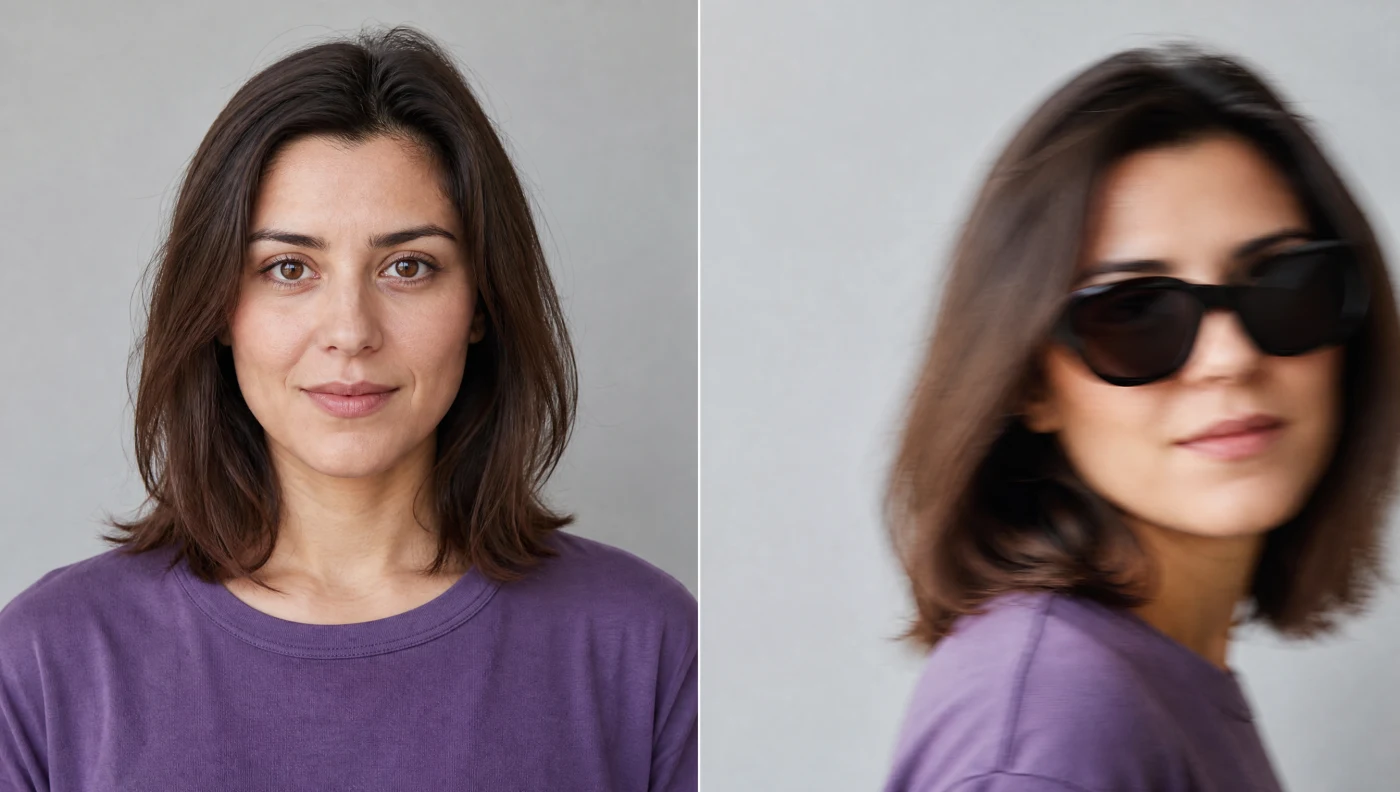
A reference image does not guarantee perfect identity preservation, but it can remove avoidable ambiguity. Use a source that clearly shows the information you want the model to retain.
Repeatable characters
Reuse the clearest approved reference image and repeat the important identity constraints in each prompt. Keep framing, lighting, and the scale of requested changes controlled while you establish a character. Generate small batches, compare the face and distinctive details, and save the strongest result as the next reference. No prompt can guarantee an identical person across every generation.
HypeUGC also provides a library of stock avatars for users. Use a stock character when you need a ready-made licensed option, or create a custom avatar when the campaign needs a specific identity or visual direction.

License-free HypeUGC stock avatar for fitness-oriented creator content.

License-free HypeUGC stock avatar for podcasting and presenter content.

License-free HypeUGC stock avatar for lifestyle and social content.
Next workflow
Create profile, social, website, and campaign images in the aspect ratio you need.
Place a product with a creator in a controlled UGC-style setting.
Take the finished static avatar to the AI Twin Generator, add a script and voice, and create a talking video. When the export is ready, use the Free AI Caption Generator to generate and burn captions into the finished video for free, with no signup.
Free allowance and provider usage
Yes. A HypeUGC account includes 50+ free AI avatar image creations. You can configure the generator before signing in, then sign in to use the free allowance without connecting an API key. After the free creations, connect your own fal.ai key in Settings; fal.ai bills the subsequent model usage to the account behind that key.
“Unlimited” refers to HypeUGC not imposing a recurring monthly generation quota on own-key usage. It does not mean provider usage is free, infinite, or exempt from fal.ai balance, rate, model, or policy limits. Each requested image can add provider usage.
Choose the right tool
| Tool | Input | Output | Use it when |
|---|---|---|---|
| AI Avatar Generator | Text prompt or reference photos | Static image | You need a reusable person or character image. |
| AI Twin Generator | Avatar image, script or narration, and voice | Talking avatar video | You need the person to deliver a spoken message. |
Responsible use
Upload only photos and brand assets you own or have permission to use. Do not impersonate a real person, misrepresent an endorsement, or create deceptive content. A connected fal.ai key is used to authorize provider generation requests, so keep the key private and manage it through HypeUGC Settings. Review the current privacy policy and terms and conditions before using personal likenesses or generated media commercially.
Questions before generating
It creates static avatar images from text prompts or edits reference photos.
This page creates images. Use the AI Twin Generator to turn an avatar image into a talking video.
Yes. Choose Image Edit, upload reference images, and describe the changes you want.
Yes. Choose Text to Image and describe the person, composition, setting, and style.
The current interface offers PNG, JPEG, and WebP output.
The current choices are 1:1, 16:9, 9:16, 4:3, 3:4, 21:9, and Auto.
Yes. You can request one to four images in a generation request.
Yes. A HypeUGC account includes 50+ free AI avatar image creations without a connected API key. Continued own-key generation is billed by fal.ai according to its current model pricing and your usage.
HypeUGC is designed for own-key generation without a recurring HypeUGC generation subscription. fal.ai provider charges still apply to requests made with your key.
Reusing the same clear reference and identity constraints can improve continuity, but model variation means perfect consistency is not guaranteed.
Choose text or photo mode, set the output for its real destination, and review identity and usage rights before publishing.